With adding the arches I needed to redesign my level to fit them in, I am also increasing the hight of the walls in some areas, this is to make this Villa seem more luxurious in its time. I have added pathways and areas that will be blocked off but due to them seeming like paths the environment seems a lot bigger for the player. The demon will be placed outside a line of wards and will be trying to get in.
Medieval Research
20 OctAll these pictures show some research I am looking at for designing my level similar to a Medieval theme. I have also fished out some old photos from my first module where we visited the royal armories, this is to give me an idea of weapons if I am too put some around. In particular I used the painting of the houses and bridge to base some of my house concepts on. The arch drawing also made me redesign my environment as I believed a Villa should be more fancy than big open area with a house and stables. By adding archways and narrow passages I can now more easily make it look bigger in the same space and block pathways with rubble to create some inaccessibility for the players.
Enviroment Design: Workshop and Stables
20 OctAbove are some drawings I created of the stables which are next to the main house, they have collapsed in the front however when you walk around the back the stables are restored and still fine at the rear of the structure. The roughness of the house was designed from pictures I researched for medieval buildings.
These are perspective drawings of wat I believe The painted man’s main room/workshop will look like, ideally I would like it to be more cluttered to represent his obsession with warding and also to show his loneliness that he has the time to sit in his workshop most of the days. Again taking notes from the book I have included many details. I am thinking of changing the cupboard to a standing unit from the medieval period, this way I can model and show his one plate, one bowl and one set of cutlery.
Enviroment Design: Hidden Ruins/Villa Art and Floorplan (Painted Man’s Hideout)
20 OctAbove is a floor plan, draft one and a concept of the area to give a better look. The environment is an abandoned villa lost with the years of demons returning, it has been reclaimed by nature, and then part restored by the painted man. The book details how the front of the buildings have collapsed but the rears are intact I try to represent this.
Enviroment Design: The Painted Man’s Hideout
18 OctThe Painted Man has lived in a hidden ruin just off the main road to the main city of Fort Miln for years. This is an ideal enviroment to model as the books describes clearly fully detailed about the room he lives in and the outside area. The downside would be I would have to model the outside to fit in a demon somewhere. The other room would be his main living area, not including the basement but rather jsut a closed trapdoor, this could explain the absence of the other 4 companions, or likewise I could model any of the following, Leesha, Rojer, Gared or Wonda. In this case I think Rojer would be interresting to model due to his Jonggeleur background and colourful clothing. This enviroment fits well into a wood demon as it is think in the forest, however in the world the chances of seeing a demon near the painted man’s home is rare as he fights them nightly.
Below is part of the book describing the majorty of the detail. I miseed a few pages out as they are character development and not actually describing the surroundings.
Enviroment Design: Anoch Sun
18 OctOne of the two enviroments I decided on fitting into the book with my demon is Anoch Sun. This is a ruin in the Krasian desert, lost in time but the only known ruin to contain the battle-wards of old. Arlen finds these ruins and quickly explores to find a coffin and the spear of Kaji, a spear of the last Deliverer. This enviroment would be fitting as it would contain small corridoors leading through a collapsed wall (which Arlen breaks himself) and the main burial room etched with wards and carvings of old battles in which the humans are depicted to be winning against the demons. Problems I can forsee is the lighting of the enviroment. I was going to fit my character, the demon, outside of the wards attempting to get in and repeatedly being repulsed by the defensive wards. You play as Arlen and have to stay the night. This isn’t 100% true to the story as Arlen leaves straight away to get back to his warded camp and I am also a bit concerned about designing a sand demon as I beleive they will look less interresting without sand falling off them which requires alot of scripting.
The paragraphs below show the part in the first book where Arlen first explores Anoch Sun.
Wood Demon: Final/Turnaround
18 OctThis is the final demon, I created this by blocking out the demons shape to a more finished silhouette and then applying some texture images. On top of that I then spent a few hours painting on top and with some parts I drew completely myself. I decided to use the longer skinnier head as it is much more scary than the others and that is the look I am going for. I added a few blood splats although I might remove them from the models textures as they seem to hide the wood detail. This demon is around 7-10 foot tall. Here is some information I gathered from the book.
Wood Demons are large Demons with almost impenetrable armour and unnatural strength to power their thick claws.
They have a long standing rivalry with Fire Demons due to their Firespit being able to threaten and kill them.
In their forest they are nearly invisible, because their armor has the same colour and form as trees.
They can go through trees or swing like monkeys from limb to limb.
Character Design: Wood Demon
16 OctThis is a sketch for the wood demon which I personally like very much, I did a few different head designs as I find thats the part which will make it most scary. The design it self was kind of again drawn on the spot but I was basing it generally on the human form with a few deformities and of course, made of wood. I was also thinking of small details like having roots for hair as I was drawing. I used a lot of images on google to just basically see how artists have used the deformities in roots and tree bark to form a more scary or threatening demon.
Below are some influences;
Demon Designs
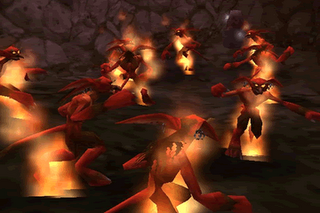
12 OctThis is a sketch of a fire demon, they are small creatures that run on four legs and can spit fire and because of this the wood demons are also hostile to them. I am trying to get a small and agile feeling by giving this demon small skinny bones and muscles while making it scary with by portraying that in the face.
As far as references went I have played alot of MMO’s in the past that involve the same sort of creatures, more or less I did it from memory and one especially I remember is the fire imps from Diablo.
This is the closest image I could find to show what I have seen before and used as a reference;
The Painted Man: Research
12 OctDuring my time off before starting this year, I read lots of books with one of them being “The Painted Man” (Warded man in the USA). I was very interested in the story of this book written by Peter V. Brett and I have thought of doing some art for the Demons in the book, then rig and animate them. The basic story is the time period is based on around Renaissance to Medieval, I say this due to the past story. Humans have fought the demons all their lives, which form at night, however long ago they discovered combat wards and drove the demons back. This period could be represented as the Renaissance as a massive surge of knowledge, after this the humans learnt technology and fought each other losing the knowledge of the combat wards. Now the demons have returned and this is where my game is set in. I hope to be designing one of the elemental demons which spawn near the same type region. I will be looking at either a flame or wood demon as in the book they are more commonly found and that allows me to fit my environment into the world more easily.
Character Design : The Mechanic
12 OctThis is my drawign sheet enhanced from some sketches I created, the character although was a spur on the moment thing does have some very distinct characteristics of which I have looked at sources I most likely have remembered them from, certainly my last drawing (far right) is based losely on the art of brink and how they exaggerated the bodies and made a more elongated frame.
Above is a picture of some of the Brink art for one of their characters, you can see the resembalance in style to the concept I have drawn.
Although I didnt think of this at the time of creation, and there are many other possible influences (Terminator etc), I found Jax a charcter Mortal Kombat who shows a good style of a muscular man with a robotic arm.
The mechanic Idea will work quite well as the enviroment could easily be created into a futuristic garage. I am currently looking at a book and creating content from that, and so I am putting this concept on the shelf for now.
First Character Thumbnails
12 OctTo start the brief off I basically did some quick sketches of whatever popped into my head, although not a particularity full sheet I managed to pick up on the mechanic man as I believe he could make an interresting character and concept. For the assassin type character I had in mind a sort of “sewer rat” type of character and although its very Assassin Creed style the character I feel would have been more of a gang member at the time of the Renaissance. I also was experimenting with animal characters that resemble the human form, this way I could quickly experiment with different shaped heads etc.
Maya: Important Rigging Information and Controls
6 OctIK (Inverse Kinematics) and FK (Forward Kinematics)
Forward Kinematics (FK)
Forwards Kinematics or FK as it is more widely known is a way of posing or animating a skeleton each part / bone at a time, for example, in the case of an arm using FK, to animate it reaching forward, you would need to rotate the arm at the shoulder joint, and then you would need to rotate the joint directly below that at the elbow. It is quite an intuitive way to animate as it provides a good visual way of posing the character just by rotating the joints into position.
Inverse Kinematics (IK)
Inverse Kinematics or IK as it is more widely known is a way of posing or animating a skeleton by using a goal based system, IK, in my opinion would be best described as imagine you have no control of you own arm, and someone else instead moves it for you, the easiest way for this person to move you arm into the required position would be to grab your arm at the wrist and then move it into position, the whole rest of the arm would follow accordingly, this is how IK works. In the case of an arm, you would have shoulder and forearms joints, you would then create an IK chain from the top to the bottom, and then when you have done that, you would select the IK handle that would be created at the bottom of the forearm joint (wrist area) and the just move that, the whole arm would then move along accordingly.
Maya provides three different types of IK Solver, these are (default) ikRPSolver (Rotate Plane), ikSCSolver (Single Chain) and also the IK Spline Handle. These are in turn described as : –
ikRPSolver
The Rotate Plane IK Solver is the default IK Solver and is probably used the most when setting up characters, it is most useful when used in conjunction with chains in joints such as an arm (where the elbow will need to be rotated into place) or a leg (where the knee will need to be rotated into place). It essentially has the ability to control the twisting direction of the chain that it is controlling.
ikSCSolver
The Single Chain IK Solver is used when no twisting action is required of the joint chain, as in a characters foot for example.
IK Spline Handle
The IK Spline Handle is actually quite a powerful handle, it is best used when you would have a complex series of joints, for example a characters spine or a character who has a tail, in both cases you would require a solver that would simplify the process of animating a lot of joints together in the same area at the same time. When a Spline Handle is used between a chain of joints, a Spline is created along the chain, and in turn the CV’s (Control Vertices) are what would be selected and manipulated for animating with, generally the CV’s would in turn be constrained to Cluster Deformers for ease of use when manipulating for animation.
Constraints
As the Maya Online Help states ‘Constraints enable you to constrain the position, orientation, or scale of an object to other objects. Further, with constraints you can impose specific limits on objects and automate animation processes.’ Constraints are used quite a lot in animation and character setup, and it’s worthwhile getting to know how they all work, so you can best utilise them within your scenes. Maya offers a number of different types of constraints, these are : –
Point constraints – Point constraints constrain an object’s position to the position of one or more objects. For example, constraining a button to a characters shirt.
Aim constraints – Aim constraints constrain an object’s orientation so that it always aims at other objects. For example, constraining eyes on a character so that they always look in a particular direction.
Orient constraints – An orient constraint causes an object to follow the orientation of one or more objects. For example, a crowd scene may require all characters to look in a particular direction at the same time, you can orient constrain all the heads to one main character to set this up.
Scale constraints – A scale constraint causes an object to follow the scaling of one or more objects. For example, constraining two characters together so that when grows (scale Y), the other grows too.
Geometry constraints – A geometry constraint restricts an object to a NURBS surface, NURBS curve, or polygonal surface (mesh). For example, constraining a drinks can to a characters hand.
Normal constraints – Normal constraints constrain an object’s orientation so that it aligns with the normal vectors of a NURBS or polygonal surface (mesh). For example, constraining a spider to a character to get it to walk over the surface correctly.
Tangent constraints – Tangent constraints constrain an object’s orientation so that the object always points in the direction a curve. For example constraining a fly character to a curve so that it animates along the curve and keeps the direction that the curves holds, i.e. if it goes up, the fly character would be facing up.
Pole vector constraints – A pole vector constraint constrains an IK rotate plane handle’s pole vector. For example,. controlling the position of a characters knee of elbow when animating (more information later).
Taken from http://area.autodesk.com/tutorials/character_rigging_in_maya
Character Research: Some Character Concept Art
30 SepHere are some good examples I talked about previously using a distinct style of exaggeration to create an exciting and visually interesting character. The almost “oil paint” style Team Fortress 2 has is a style I very much like and brings in a very colourful and vibrant environment.
Character Research: What makes a good Character?
30 SepLacking character? Jon Burgerman drums up 20 tips for creating fantastic characters and the best ways to bring them to life.
Character design can be a tricky beast to tackle, because although many of the classic characters familiar to us all through cartoons, entertainment and advertising look simple, that simplicity usually belies the many hours of work that have gone into their development.
From Mickey Mouse’s famous three-fingered hands – drawn to save production time when the character was first developed for animations in the 1920s – to the elegant simplicity of Homer Simpson, character design has always been about keeping it simple. But aside from clean lines and easily readable features, what else are you going to need to know? There’s knowing what to exaggerate and what to play down, what to add to give a hint of background and depth, and what to do to develop personality. Getting started can be the trickiest part in any character development project, but once you’ve got some ideas these tips will help you breath life into your creation…
1: Research and evaluate
It can be helpful to try and deconstruct why certain characters and their characteristics work and why some don’t. There’s no shortage of research material to be found, with illustrated characters appearing everywhere: on TV commercials, cereal boxes, shop signs, stickers on fruit, animations on mobile phones, and more. Study these characters and think about what makes some successful and what in particular you like about them.
2: Design and plan
Where will the character be seen and in what medium? This will have a direct bearing on how you go about your design. For example, if the character is for a mobile-phone screen, there’s no point designing it to have a lot of intricate details and features. Nathan Jurevicius says, regardless of the format, “The process of thinking up concepts always starts the same: paper, pencil, green tea… lots of thumbnails, written ideas, scratches and sketches over sketches.”
3: Who is it aimed at?
Think about your audience. Characters aimed at young children, for example, are typically designed around basic shapes and bright colours. If you’re working for a client, the character’s target audience is usually predetermined, as Nathan Jurevicius explains: “Commissioned characters are usually more restrictive but no less creative. Clients have specific needs but also want me to do my ‘thing’. Usually, I’ll break down the core features and personality. For example, if the eyes are important then I’ll focus the whole design around the face, making this the key feature that stands out.”
4: Visual impact
Whether you’re creating a monkey, robot or monster, you can guarantee there are going to be a hundred other similar creations out there. Your character needs to be strong and interesting in a visual sense to get people’s attention. When devising The Simpsons, Matt Groening knew he had to offer the viewers something different. He reckoned that when viewers were flicking through TV channels and came across the show, the characters’ unusually bright yellow skin colour would grab their attention.
5: Line qualities and styles
The drawn lines of which your character is composed can go some way to describing it. Thick, even, soft and round lines may suggest an approachable, cute character, whereas sharp, scratchy and uneven lines might point to an uneasy and erratic character. Sune Ehlers characters are bold and seem to dance on the page, which echoes his approach to drawing them. He explains: “Drawing a doodle is about decisive pen-manoeuvring. A strong line for me comes from strength and rhythm.”
6: Exaggerated characteristics
Exaggerating the defining features of your character will help it appear larger than life. Exaggerated features will also help viewers to identif y the character’s key qualities. Exaggeration is key in cartoon caricatures and helps emphasise certain personality traits. If your character is strong, don’t just give it normal-sized bulging arms, soup them up so that they’re five times as big as they should be!
7: Colour me bad
Colours can help communicate a character’s personality. Typically, dark colours such as black, purples and greys depict baddies with malevolent intentions. Light colours such as white, blues, pinks and yellows express innocence, good and purity. Comic-book reds, yellows and blues might go some way to giving hero qualities to a character.
8: Adding accessories
Props and clothing can help to emphasise character traits and their background. For example, scruffy clothes can be used for poor characters, and lots of diamonds and bling for tasteless rich ones. Accessories can also be more literal extensions of your character’s personality, such as a parrot on a pirate’s shoulder or a maggot in a ghoul’s skull.
9: The third dimension
Depending on what you have planned for your character, you might need to work out what it will look like from all angles. A seemingly flat character can take on a whole new persona when seen from the side if, for example, it has a massive beer belly. If your character is going to exist within a 3D world, as an animation or even as a toy, working out its height, weight and physical shape is all important.
10: Conveying personality
Interesting looks alone do not necessarily make for a good character; its personality is key as well. A character’s personality can be revealed through comic strips and animations, where we see how it reacts to certain situations. The personality of your character doesn’t have to be particularly agreeable, but it does need to be interesting (unless your characters is purposely dull). Personality can also be expressed simply in how the character has been drawn.
11: Express yourself
Expressions showing a character’s range of emotions and depicting its ups and downs will further flesh out your character. Depending on its personality, a figure’s emotions might be muted and wry or explosive and wildly exaggerated. Classic examples of this can be found in the work of the legendary Tex Avery: the eyes of his Wild Wolf character often pop out of its head when it’s excited. Another example of how expressions communicate motions is deadpan Droopy, who barely registers any sort of emotion at all.
12: Goals and dreams
The driving force behind a character’s personality is what it wants to achieve. This missing ‘something’ – be it riches, a girlfriend or solving a mystery – can help to create the dramatic thrust behind the stories and adventures your character gets up to. Often the incompleteness or flaws in a character are what make it interesting.
13: Building back stories
If you’re planning for your character to exist within comics and animations then developing its back story is important. Where it comes from, how it came to exist and any life-changing events it has experienced are going to help back up the solidity of, and subsequent belief in, your character. Sometimes the telling of a character’s back story can be more interesting than the character’s present adventures… or not, in the case of the Star Wars prequels.
14: Quick on the draw
Don’t be afraid to experiment and ignore all the rules and tips about planning and crafting the look of your character. Going against what is supposed to be the right way of doing something could create unexpected and exciting results. When artist Yuck creates his characters he doesn’t really know what he’ll draw. “I just listen to music and draw the result dependent on my mood: freaky or cute. I always want to have a drawing that I find interesting. I then work more on the character after it’s okay with me and my brain,” he says.
15: Hone, plan and polish
Instead of just drawing or doodling without too much pre-planning, Nathan Jurevicius prefers to take a different approach. “I take a long time creating finished looking roughs and also thinking about how the character could be expanded beyond a 2D artwork, what the character will do in a specific world, and how it speaks and acts,” he says.
16: Drawn in mud
Having decent materials to work with is useful, but not essential, for the early planning of your character. A lot of amazing characters were successfully designed years ago when no one had personal computers and Photoshop was just a dream. The drawings of your character should still work when rendered on paper with a simple pen or, as Sune Ehlers puts it, “The character should still be able to work with a stick dipped in mud and drawn on asphalt.”
17: Real-world drawing
Ian, of I Like Drawing, generates some of his characters away from both the computer and the sketchbook, allowing outside elements to influence his work. “I really like characters that interact with their surroundings,” he says. “The environment normally suggests an idea and then I let my strange mind do the rest. I prefer drawing in the real world with a pen instead of on the computer, because it feels good and odd things happen.”
18: Release the beast
Show people your creations and ask them what they think. Don’t just ask whether they like them or not. Instead, see if they can pick up the personalities and traits of your characters. Find who you think is the suitable or ideal audience for your work and get feedback specifically from them about it.
19: Beyond the character
In the same way that you create a history for your character, you need to create an environment for it to help further cement believability in your creation. The world in which the character lives and interacts should in some way make sense to who the character is and what it gets up to.
20: Fine-tuning a figure
Question each element of your creation, especially things such as its facial features. The slightest alteration can have a great effect on how your character is perceived. Illustrator Neil McFarland advises: “Think about the meaning of the word ‘character’. You’re supposed to breath life into these things, make them appealing and give them the magic that will allow people to imagine what they’re like to meet and how they might move. I think it’s strange how creating characters for the sake of it has become a distinct branch of graphic design.”
This is a very interesting post on creating a creative character that could be iconic. He also shows through examples and quotes of other artists that everyone works in a different way unique to them and therefore they should work to their strengths. I Personally like to do lots of detailed roughs and think about the characters while drawing them, and if one catches my eye or a few I really like, I carry on slowly narrowing down and becoming more detailed. In one of the points Burgerman talks about exaggeration and to exaggerate your character, this can create very stylistic art and great examples of games are Team Fortress 2 with its distint style of exaggerating body parts and character personalities. Another would be something along the lines of Monkey Island or Rachett and Clank. However one problem I have had in the past is over exaggerating, in my opinion you should just draw your character and then see which parts have roughly changed or created a stylised look, then you can detail and refine. If I think too much about exaggerating my character before I have the basics most of the time my drawings end up looking poor. By far a important one was point 4, having visual impact, without it your character will just fall into a sea of millions of other characters similar to yours. They have to be unique interesting and have a good personality to stand out.
For the sake of easier reference, the points in order:
1: Research and evaluate
2: Design and plan
3: Who is it aimed at?
4: Visual impact
5: Line qualities and styles
6: Exaggerated characteristics
7: Colour me bad
8: Adding accessories
9: The third dimension
10: Conveying personality
11: Express yourself
12: Goals and dreams
13: Building back stories
14: Quick on the draw
15: Hone, plan and polish
16: Drawn in mud
17: Real-world drawing
18: Release the beast
19: Beyond the character
20: Fine-tuning a figure
Personal Evaluation
31 MayAt the start of the project we were quite slow with myself on holiday but during this phase Dan and Danny built up some initial research, which did lead to our character design William Dyer. I would say we have very similar skill sets and this made it difficult for us split roles, I decided to get some early concept art out as this was very sparse. In reflection more concept art was probably needed especially in the environment as I found it difficult modelling the rooms later on, most of the time sending me back to the drawing board.
I developed moderately good modelling skills in Second Life as I designed the main chamber, the caves and scripted all the sounds and animations. The scripting was new to me however I did understand simple scripts, harder ones I took guidance from the Internet or the tutor. As far as textures went I really only used online textures and edited them to create a different pattern or make them seamless. I didn’t really make any textures from new for the environment; we were more original with character textures.
The building of the whole structure was quite difficult as I was new to Second Life and with the lack of concept art I didn’t really know where to start. Eventually it came together by making on the spot choices and also using others on the course to test the game. Playing it through myself also helped substantially in development. This enhanced my skills with placing objects like pillars in correct places to break line of sight with repeating textures and such things to make the rooms seem more unique.
As a fan of Maya after my animation course I used it a lot to convey concept art ideas and attempt to build objects and particularly William Dyers suit. I have a lot to learn with using NURBS as I found them very difficult to master and very different to polygons. The biggest thing I learnt was that you can use polygons in second life providing they are 32×31 and either a sphere or plane. From this module my Maya skills have definitely improved and I am starting to really enjoy using the program.
Another new feature I added in this brief was creating my own music, we did this in the college recording rooms and with Dan’s assistance we recorded alien whispers and guitar and drum loops. I then later composed everything together and integrated it into the game.
If we were to start from scratch I think I would be more organised with work and organisation of the group as I personally felt I did the most work and put the most effort in. A bit of leadership and correctly distributing jobs would sort this.
I enjoyed the project overall and learnt a lot of valuable skills. I would have liked to create a movie type machinema rather than walkthrough but we had little time left. Again down to poor planning.
Creating The Elder
31 MayHere I make the Elder, the last alien to create. Once again Danny was in charge of textures although I did have to do a quick one for the bumble bee bit on the head. The ehad was quite hard to get close to the concept art due to prim shapes and what you can do with them. The skin was alpha textured to give floating arms effect. This however also made the arms and hands have see through parts which I filled with sphere prims made to glow green. Again the head was the only hard part, the rest of the body was made using SL default tools, the claws were the same as the soldier.
Creating the “Soldier” Alien
31 MayThese are screenshots from the making of the Soldier alien. This one was quite easy as I only had to model the head and claws and most the textures were solid colours. Danny created the body UV maps, and then I simply did bold colours to add like black and red to fit the concept art. There are some screenshots of him on all fours as I wanted to see if it looked better but in the end we will go with a walk animation. The body was shaped with the functions given by SL.
Teleporter Script SL
31 MayThis is the teleporter script, clicking this causes you to be teleported to the destination co-ordinates. (vector dest)
key lastAVkey = NULL_KEY;
string fltText = “To Lower Chamber”;
vector dest = ; // X Y Z coordinates
init()
{
llSetSitText(“Teleport”);
llSetText(fltText, , 1);
llSitTarget(dest-llGetPos(), );
}
default
{
state_entry()
{
init();
}
touch_start(integer i)
{
init();
}
changed(integer change)
{
key currentAVkey = llAvatarOnSitTarget();
if (currentAVkey != NULL_KEY && lastAVkey == NULL_KEY)
{
lastAVkey = currentAVkey;
if (!(llGetPermissions() & PERMISSION_TRIGGER_ANIMATION))
llRequestPermissions(currentAVkey,PERMISSION_TRIGGER_ANIMATION);
llSleep(0.5);
llUnSit(currentAVkey);
llStopAnimation(“sit”);
llResetScript();
}
}
}
The teleporter sits on a hub that spawns the teleporter when placed, this script is added as well as the item “teleporter” with the script above inside that object.
This is the hub script;
integer made = 0;
default
{
state_entry()
{
llSetText(“”, , 0.8);
llSetTimerEvent(4.0);
}
timer()
{
llSensor(“teleporter”, NULL_KEY,PASSIVE, 5, PI);
}
sensor(integer total_number)
{
// llSay (0, “Teleport already available”);
}
no_sensor()
{
state create;
}
}
state create
{
state_entry()
{
llRezObject(“teleporter”, llGetPos() + , ZERO_VECTOR, ZERO_ROTATION, 42);
state default;
}
}
Sliding Door Script SL
31 Mayinteger pitch = 50; //Steps for the door to take to open and close. More Steps will make the door open and close more slowly.
float TimeInterval = 6.0; //Seconds to keep the door open.
integer TouchFlag;
integer Holding;
integer SecureFlag;
Open()
{
TouchFlag = TRUE;
llTriggerSound(“DoorSound”, 1.0);
integer i;
for(i = 0; i < pitch + .5; i++)
{
llSetPrimitiveParams([PRIM_TYPE, 0, 0, ,
0.949000, , ,
]);
}
llSetTimerEvent(TimeInterval);
}
Close()
{
llSetTimerEvent(0);
TouchFlag = FALSE;
llTriggerSound(“DoorSound”, 1.0);
integer i;
for(i = pitch – 1; i >= 0 ; i–)
{
llSetPrimitiveParams([PRIM_TYPE, 0, 0, ,
0.949000, , ,
]);
}
}
TouchOpen()
{
if(TouchFlag == FALSE)
{
Open();
}
else
{
Close();
}
}
CollideOpen()
{
if(TouchFlag == FALSE)
{
Open();
}
else
{
llSetTimerEvent(TimeInterval);
}
}
Init()
{
}
default
{
state_entry()
{
Init();
}
changed(integer change)
{
if(change & CHANGED_OWNER)
{
llResetScript();
}
}
touch(integer total_number)
{
if(llDetectedKey(0) == llGetOwner())
{
Holding++;
if(Holding == 50)
{
if(SecureFlag == FALSE)
{
llOwnerSay(“Door Locked”);
SecureFlag = TRUE;
}
else
{
llOwnerSay(“Door Unlocked”);
SecureFlag = FALSE;
}
}
}
}
touch_end(integer total_number)
{
Holding = 0;
if(SecureFlag == FALSE)
{
TouchOpen();
}
else
{
if(llDetectedKey(0) == llGetOwner())
{
TouchOpen();
}
else
{
llWhisper(0, “Sorry, this door is locked.”);
}
}
}
collision_start(integer num_detected)
{
if(SecureFlag == FALSE)
{
CollideOpen();
}
else
{
if(llDetectedKey(0) == llGetOwner())
{
CollideOpen();
}
else
{
llWhisper(0, “Sorry, this door is locked.”);
llSleep(5.0);
}
}
}
timer()
{
Close();
}
}
This also has a lock feature but I am not using this in the game, the doors open by clicking or causing contact, they play a sound that sounds like moving rocks… Its actually a bicycle on gravel from the bbc sound collection.
New Final Walkthrough
31 MayThe finished design, a walkthrough of how the design has evolved, there are two teleporters and 3 working doors. The sounds are fully integrated adding whispers wind and a soft backing track throughout. The last temple bit requires some jumping but is very hard mainly due to physical scripting and a invisible prim that needs to be moved.
Cave Final Design Screenshots
31 MayThe screenshots from the cave, the idea was to create a natural cave opening that slowly turns into a alien made corridor. The trap door is supposed to fall down into a sacrificial type bit, the lower bit is also supposed to be a ice cavern to keep the surrounds fresh and not too repeated. Icicles are added around and generally ins very linear but interesting. The trap door is made less suspicious but adding scenery in the distance, this makes the player think there is content over there that he ignores the trapdoor.
Corridor and Main Chamber Concepts
30 Mayhere are two drawings which again were done duriong the building process. The idea to change to a giant cube was one I decided upon because it was simple, looked good and broke up the room. It saved me spending alot of time on a big ritual tower which we moved to a lower level anyhow. This cube was more a design of power that help heeps things running for the aliens. I got the idea from a concept of a Asura temple for the GW2 concepts. You can see from a old maya model I did how the main object has changed as we originally wanted a large tower that you could see from the entrance. The cube is big however the starting focal point is the rotating rocks above it caused by its power flux.
Pillar Concepts and Final Design
30 MayIdeally the pilalrs in the room were essential. Not only would they add decoration they would, break the room up, make it seems much more full and interesting and also break the textures so the eye doesnt catch repeating textures as much. I wanted something more than just a straight pillar, and I wanted to go with the concepts I had been doing of magic, and floating objects. I didn’t do many concepts as we wer ein the building stages luckily I came accross a design I liked early on. I then created a slightly more detailed version but in the end they were quick drawings so I could get on with building.
Malteaser and the Nut, Advert Idea
30 MayThis was just some fun in my spare time, while at centre parcs I managed to shoot some video and decided… What do squirrels prefere, Malteasers or Nuts? Watch to find out!
Character Concept Art
30 MayDanny has been busy with the character concept turning my sketches into detailed concepts, here are the results which are very good. We have all three aliens and ofcourse William Dyer. Danny has even inlcuded key facts!
Sound Recording
28 MayMe and Dan hit the recording studio to work on our audios, we created theme tunes and alien whispers and sounds, sounds folr the wind lightning and doors were taken from the BB sound collection.
These are all the sounds we created during our recording session, Dan Holroyd helped me record all the sounds and I then later peiced all the parts together.
This is our Alien whisper 1 which was put into trigger boxes;
This is our second trigger whisper;
This was our trap door tune which triggers as you fall down as also as you go through the first teleporter. It was meant to give a slight rush of adrenaline with a higher tempo beat, it was made up of 4 different tracks I recorded on guitar. A base, which was a recurring E Minor chord, and If I remember correctly F being the beat and quit dominant while the drum beat was added by hitting the guitar. A high tune was added by playing higher up the neck.
The next tune was a loop that played quite quietly throughout the decent, this was created with a A minor chord and A m7 chord to create a very minor, slow and creepy tune.
Here is a whisper sound I made, this one was created as a loop so you hear whispers 24/7 this is used in palces around the map but lots int he pit when you fall down.
Early Walkthrough of Game Level
28 May
This is a beta walkthrough of everything I have created, this is very basic with the cave unfinished and intextured. However the principle is there, one thing that popped up during testing was the the cave was not that visible and players would run past it. (The intial design was players could choose to continue on the spiral or enter the cave) To solve this I made a fallen over pillar in which players are forced to turn back and notice the cave. This shows the alien corridoor in the cave and also the hidden pit drop. I will update the finished walkthrough to show how majorly it has changed and also show the lower parts and final temple room created by Dan.
Temple Creation Update 2
28 MayI have built much more adding or gaining scripting for doors the open upon physical contact or touch, this also created the trap door. A telported was created with help from Annabeth and also some online tutorials, this allows the player to telport to the lower level from the cube and also teleport back up to the start when you reach the end. More textures were added however not much of the cave is shown so I will get more screenshots of that and also somke design ideas I implemented to make the spiral less tedious.
William Dyer Creation In SL
28 MayThis surprisingly was one of the hardest parts of the brief due to not knowing about prims and polygons to the maximum. I tried many mediums, first I went the maya approach creating NURBs and trying to upload them. However I find NURBS hard to model and are quite ugly in thier smooth look. I then was informed polygons could be imported in providing on 2 conditions, they were either a plane or sphere, and that they were 32×31 edge loop count. To get the ffect with a plane you have to bend the ends off almost like a curtain to fold it into the character skin, if you failed to do this the object would be see through on the side where the polygons are not facing outwards. In the end due to the armours primitive shapes I went with full modeling in SL. To make this easier I created a T-pose animation in which I could loop on the character while modeling this allowed me to place the armour on the model much easier. The important feature was making sure you attach to the right attachment points say left shoulder. The left shoulder moves hoiw it would when the character moves, if you place an aobject in say the chest and move it onto the shoulder it will most likely clip through the character with the wrong animations. After all the armour I then set on making Dyer more “buff” I increased height and muscle size, especially on the legs. As a base I used a SL preset wet suit type skin froma cyborg build. I gave Dyer a large jaw adding a cartoon feel but also a more hero feel.
Created Textures
28 MayThe textures I created was the lightbeam texture to create the massive lightrays inside our cave. It was done with a full black layer on photoshop with a texture (fibre) effect added to cause streaks into the pattern, it was then motion blurred to smooth them off and cause a variety of different shaped lines and more integer alpha lines. Using the alpha channel a gradient was added going black to transparent this made the lightrays fade off towards the end. Using brightness and contrast I tweaked it to get the lightrays as I wanted.
A second texture I edited was taken from a online source of a seamless brickwall texture. I then added alien inscriptions on Photoshop and added hue effects. The writing consisted of 3 layers, a vivid bright 30%, overlay 80% and an distorted, bumpmapped version. This was created by saving the brickwall as a displacement and then using it to distort the text. This final texture was used on most of the Alien buildings, doors and technology. Dan Holroyd used it slightly however he created a slightly different appearance below although it adds a different dynamic.
Textures Taken
28 MayThese 3 textures were primarily used around the caves etc and the armour for William Dyer. I left the rocks and armour untouched however I spent a long time getting the ice texture seamless as I wanted a realistic texture for the ice caverns and icilcles. This was done by offsetting the image to create 4 repeated tiles on photoshop. The original image was also duplicated behind the layer. Using the eraser tool I slowly cut away at the offset seams and patterns to create a more varied effect. I had to layer tweak it more as the lighting patterns and crascks in the ice texture could be seen repeated alot.
Robot Texture
26 MayThis is a texture Dan asked for to apply to lower levels, it was aquired through a program called Genetica viewer 3.5. I had to fiddle a few settings but generally it is to make sure 100% it is seamless. A interesting program I will be sure to use again. It is windows only however so I had to do this on my flat computer.
Lightning Images For SL Animation
24 MayThese images were implemented into the pillars and the cube to create a force that holds everything together, the lighting also adds a very good effect in the dark. I experimented using them of a cube prim and having a script of the sides rotating giving a 6 fps animation. In the end I placed one of the images on a cylinder prim and attached a smooth anim script meaning the texture rolls on one surface of the prim, after increasing the speed it gave the appearance of the lightning coiling very fast in around the alpha cylinder.
Initial Sketches
24 MayThis were very quick sketches of aliens, and also sets for the temple and how it might look as well as how I can make the concepts seem more interesting from a shot point of view. Hard to see but I draw very faint while pumping out quick ideas on the bus.
SL Temple Creation 1
24 MayThe screenshot show some of the development I have built. So far I have added magical pillars holding up the interior structure taken from quick concepts of Pillars to add in. Lightbeams have been added from the roof with prims created with full glor put on the outside to give the appearance of a blinding light. The middle object has now become a large rotating cube, the current texture is just for design purposes and a different one will be created. One of the screenshots shows the exterior blocks which are forming the outside cave system. The cave was added without the art or plans due to the spiral working out very boring from a game play perspective, I will create plans and art for it a bit later. So far the design is coming along nicely with Dan Holroyd building the section under the cube. and the temple ritual area.
Avimator and Animation in SL
24 MayThese screenshots show a process of using a program called Avimator which is a character animation program designed specifically for use in SL. The Animator is quite easy to use, working with moving set joints on x,y or z axis. Once key framed they highlight green and the parts green will be animated, with non keyframed using the SL default animations. Much like most animating programs it works by keyframing, moving the object and keyframing again. The only difference is it is ESSENTIAL to start on frame TWO as the program recognises it is an amimation by reading the first frame as a t-pose. One problem I did come across was SL characters being different shapes and sizes, this means some animation that say touch the face might not touch the face if your character has a smaller head or short arms etc. A point I noticed two was leaving one arm deafault while creating a complex animation caused it to “bug” out and pull into body parts etc. The solution would be to jsut animate the whole body, especially when sitting down. Dan Holroyd uised this program to create the animation for holding the gun of William Dyer, this allowed better interaction with the touchlight and meant the gun didnt just dangle down all the time.
Using Particles in SL
24 MayThere is a preset particale script gained online from a script generator, ffrom the presets they give you, you have the ability to change the particles to fly in multiple directions, at different speed and angles and increase arcs etc. Here is the noted script;
“// Mask Flags – set to TRUE to enable
integer glow = FALSE; // Make the particles glow
integer bounce = FALSE; // Make particles bounce on Z plane of object integer interpColor = TRUE; // Go from start to end color
integer interpSize = TRUE; // Go from start to end size
integer wind = TRUE; // Particles effected by wind
integer followSource = FALSE; // Particles follow the source integer followVel = FALSE; // Particles turn to velocity direction
// Choose a pattern from the following:
// PSYS_SRC_PATTERN_EXPLODE
// PSYS_SRC_PATTERN_DROP
// PSYS_SRC_PATTERN_ANGLE_CONE_EMPTY
// PSYS_SRC_PATTERN_ANGLE_CONE
// PSYS_SRC_PATTERN_ANGLE
integer pattern = PSYS_SRC_PATTERN_ANGLE_CONE;
// Select a target for particles to go towards
// “” for no target, “owner” will follow object owner
// and “self” will target this object
// or put the key of an object for particles to go to
key target = “”;
// Particle paramaters
float age = 1; // Life of each particle
float maxSpeed = 4; // Max speed each particle is spit out at float minSpeed = 3.5; // Min speed each particle is spit out at string texture = “Water Particle 4”; // Texture used for particles, default used if blank float startAlpha = 1; // Start alpha (transparency) value float endAlpha = 0.1; // End alpha (transparency) value vector startColor = ; // Start color of particles vector endColor = ; // End color of particles (if interpColor == TRUE) vector startSize = ; // Start size of particles
vector endSize = ; // End size of particles (if interpSize == TRUE) vector push = ; // Force pushed on particles
// System paramaters
float rate = 0.05; // How fast (rate) to emit particles float radius = 0.1; // Radius to emit particles for BURST pattern integer count = 30; // How many particles to emit per BURST float outerAngle = 0.0; // Outer angle for all ANGLE patterns
float innerAngle = 0.20; // Inner angle for all ANGLE patterns vector omega = ; // Rotation of ANGLE patterns around the source float life = 0; // Life in seconds for the system to make particles
// Script variables
integer pre = 2; //Adjust the precision of the generated list.
integer flags;
list sys;
integer type;
vector tempVector;
rotation tempRot;
string tempString;
integer i;
string float2String(float in)
{
return llGetSubString((string)in,0,pre – 7);
}
updateParticles()
{
flags = 0;
if (target == “owner”) target = llGetOwner();
if (target == “self”) target = llGetKey();
if (glow) flags = flags | PSYS_PART_EMISSIVE_MASK;
if (bounce) flags = flags | PSYS_PART_BOUNCE_MASK;
if (interpColor) flags = flags | PSYS_PART_INTERP_COLOR_MASK;
if (interpSize) flags = flags | PSYS_PART_INTERP_SCALE_MASK;
if (wind) flags = flags | PSYS_PART_WIND_MASK;
if (followSource) flags = flags | PSYS_PART_FOLLOW_SRC_MASK;
if (followVel) flags = flags | PSYS_PART_FOLLOW_VELOCITY_MASK;
if (target != “”) flags = flags | PSYS_PART_TARGET_POS_MASK;
sys = [ PSYS_PART_MAX_AGE,age,
PSYS_PART_FLAGS,flags,
PSYS_PART_START_COLOR, startColor,
PSYS_PART_END_COLOR, endColor,
PSYS_PART_START_SCALE,startSize,
PSYS_PART_END_SCALE,endSize,
PSYS_SRC_PATTERN, pattern,
PSYS_SRC_BURST_RATE,rate,
PSYS_SRC_ACCEL, push,
PSYS_SRC_BURST_PART_COUNT,count,
PSYS_SRC_BURST_RADIUS,radius,
PSYS_SRC_BURST_SPEED_MIN,minSpeed,
PSYS_SRC_BURST_SPEED_MAX,maxSpeed,
PSYS_SRC_TARGET_KEY,target,
PSYS_SRC_ANGLE_BEGIN,innerAngle,
PSYS_SRC_ANGLE_END,outerAngle,
PSYS_SRC_OMEGA, omega,
PSYS_SRC_MAX_AGE, life,
PSYS_SRC_TEXTURE, texture,
PSYS_PART_START_ALPHA, startAlpha,
PSYS_PART_END_ALPHA, endAlpha
];
llParticleSystem(sys);
}
default
{
state_entry()
{
updateParticles();
}
}
”
This would be good for snow with the right changes and also any alien particles coming from thier technology.